
What is a ledger?
The ledger is the list of invoices. The customer ledger shows what each customer has been invoiced, what has been paid and what is left, and the total of what is left should match the accounts receivable in the books. The supplier ledger is the same thing the other way round: supplier invoices and accounts payable.
The books tell you how much customers owe. The ledger tells you who, since when and how they usually pay. That difference is what makes follow-up of receivables possible in practice, and what lets you forecast cash from the invoices that are actually outstanding.
Customers: who owes what, and who pays late?
At the top is the position today: accounts receivable, what is overdue, what falls due within fourteen days and how large a share is paid on time. Below that:
- The ageing analysis. The open invoices by due date, from those that fell due more than sixty days ago to those that fall due in more than a month. Click a bar and its invoices are listed.
- To follow up. The overdue invoices, oldest first, with customer, amount and how many days ago they fell due.
- Invoicing. Per month, per customer, item or account, and how large a share comes from the biggest customers.
- The customer list. For each customer the amount invoiced, the open and the overdue amounts, the payment time and the share of invoices paid on time.
Click a bar or a row and the rest of the page shows only that selection: a month, a customer, an item. Opening the selection shows the key ratios and the invoices behind them, and a click on a customer opens the customer card with all its invoices.
Try it yourself
The ledgers in the demo
The demo opens Planning with the fictitious Installation AB. Click Ledgers under Analysis in the menu on the left. No registration, no figures of your own.
Try it yourselfSuppliers
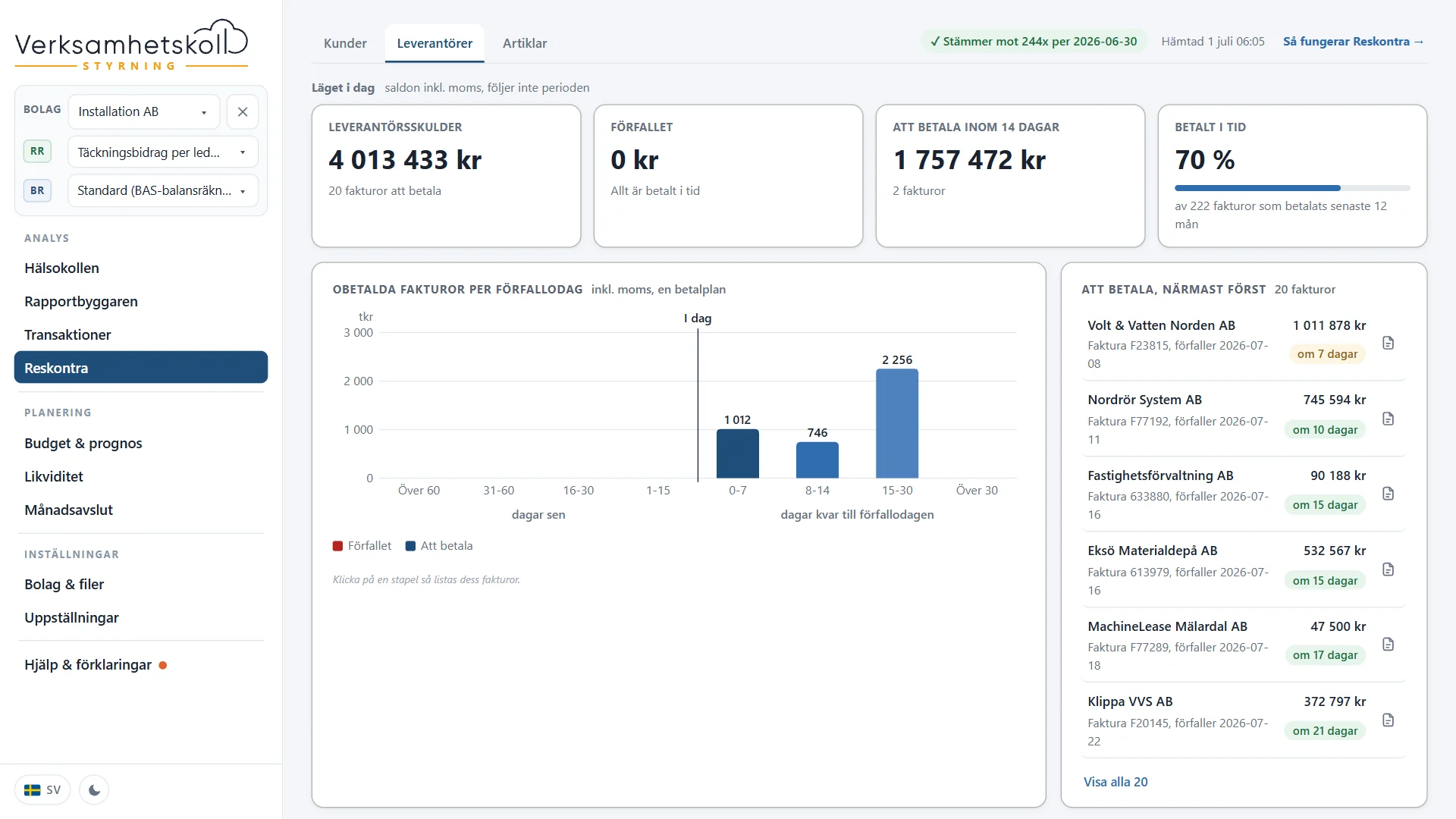
The same picture the other way round: the unpaid invoices with the supplier's own invoice number, the ageing analysis, purchases per supplier and month and which cost account each supplier is booked to. The To pay list shows what falls due soonest first, so what has to be paid in the next few weeks is visible before it becomes urgent.
What you sell, item by item
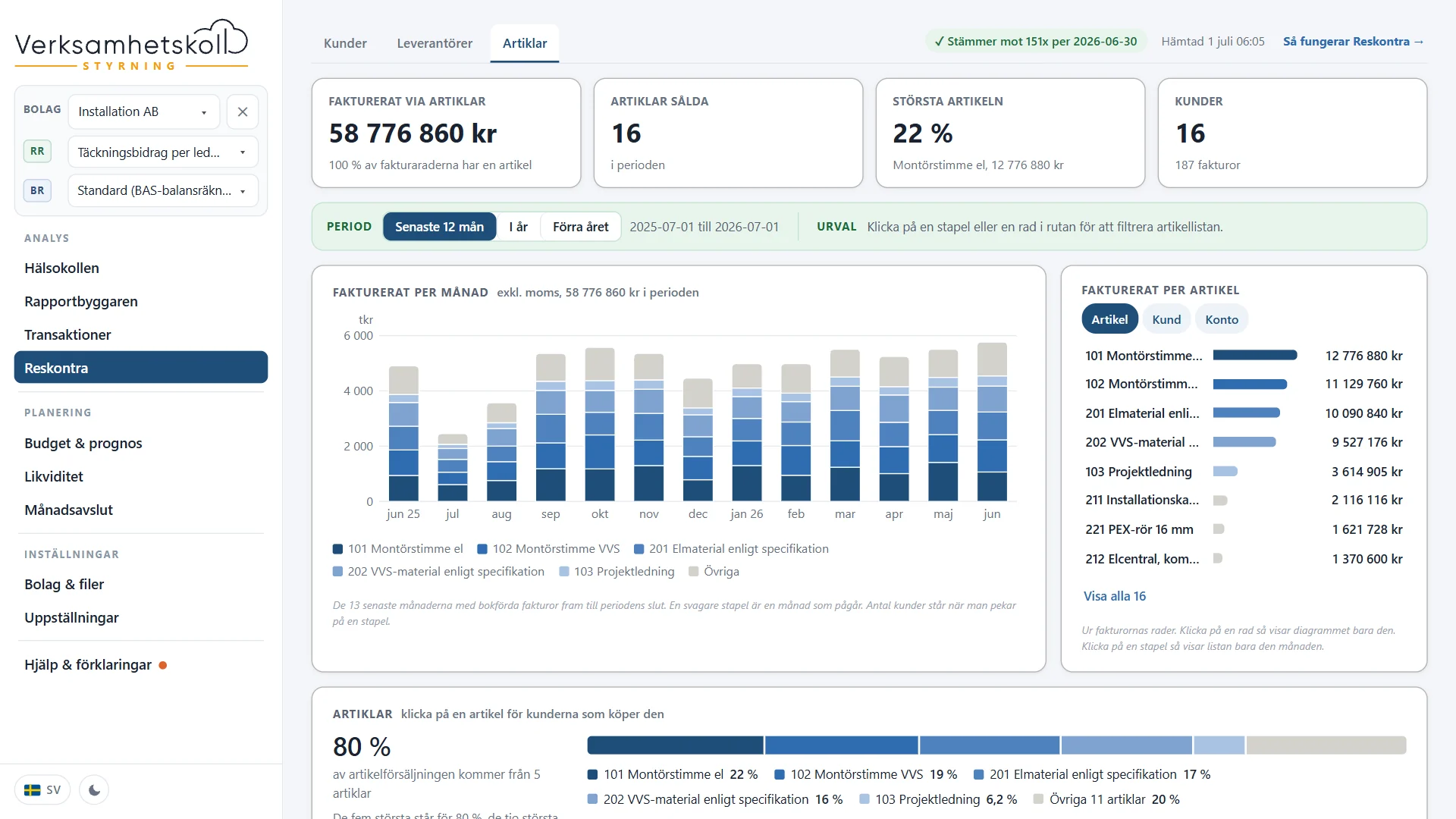
The Items tab reads the invoice lines: what you invoice per item, how the item mix changes month by month and which customers buy a given item. It is shown for companies that invoice with items.
The invoice and its attachment
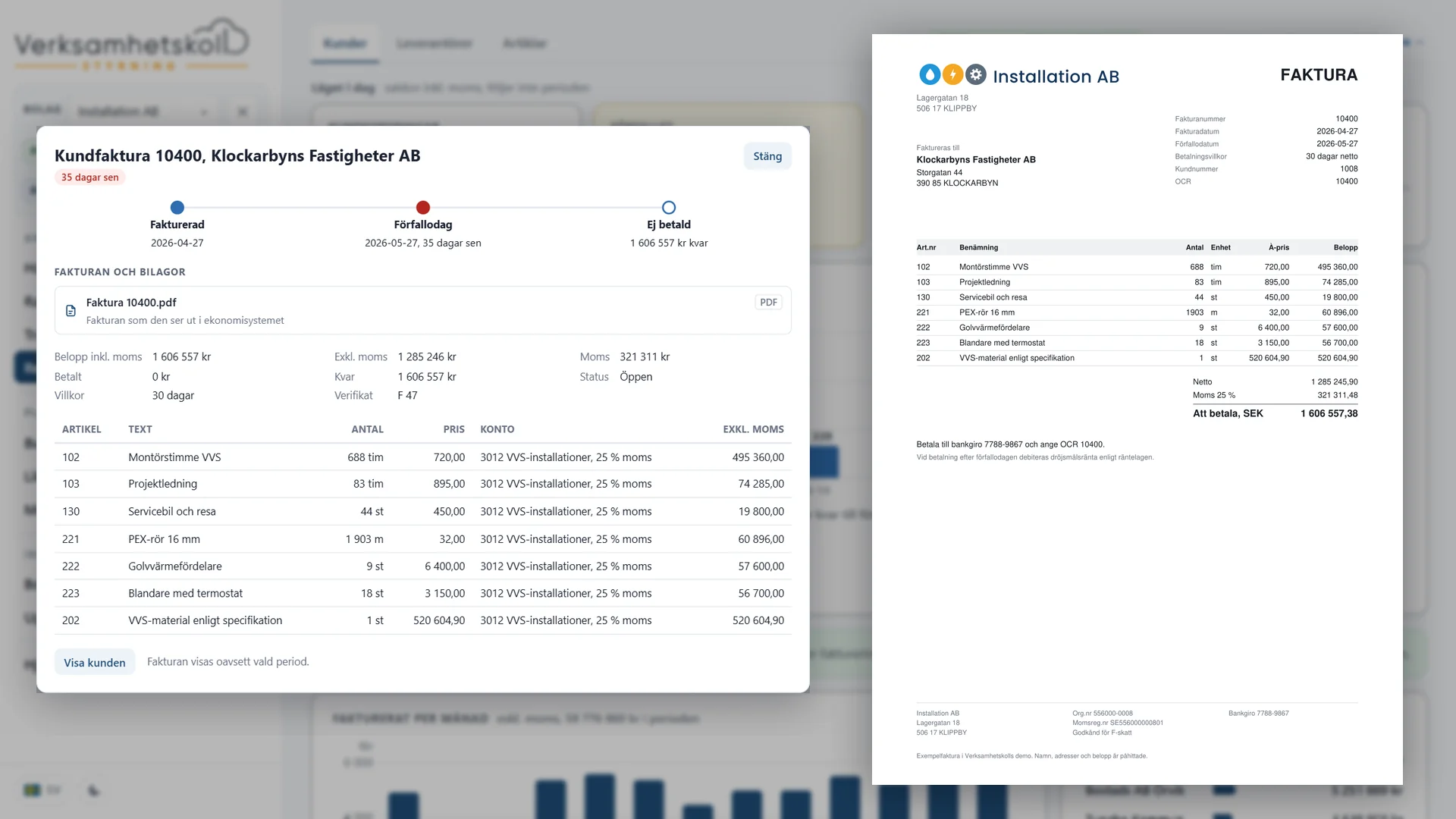
Each invoice opens in its own window with amount, VAT, paid, remaining, terms, journal entry and the invoice lines, whichever period you are looking at. The invoice as it looks in the accounting system opens with one click.
The same goes for the books: the attachments to a journal entry open from the journal entry in Transactions and Month end, so the path from a figure in the report goes all the way down to the supporting document. Read more about the drill-down on the page about financial reporting.
Reconciled with the books
A ledger that does not match the books cannot be trusted. That is why it is reconciled every night: the open customer invoices against the accounts receivable in the books, and the unpaid supplier invoices against the accounts payable. The result is shown at the top of the tab, so you know the list is the whole truth.
Cash is forecast from the invoices
The liquidity forecast places each open customer invoice on its due date, plus the delay that particular customer usually has, and each unpaid supplier invoice on its due date. What is already overdue is counted as coming in today at the earliest. The How the forecast is calculated box shows the line, how it is calculated and that it comes from the ledgers.
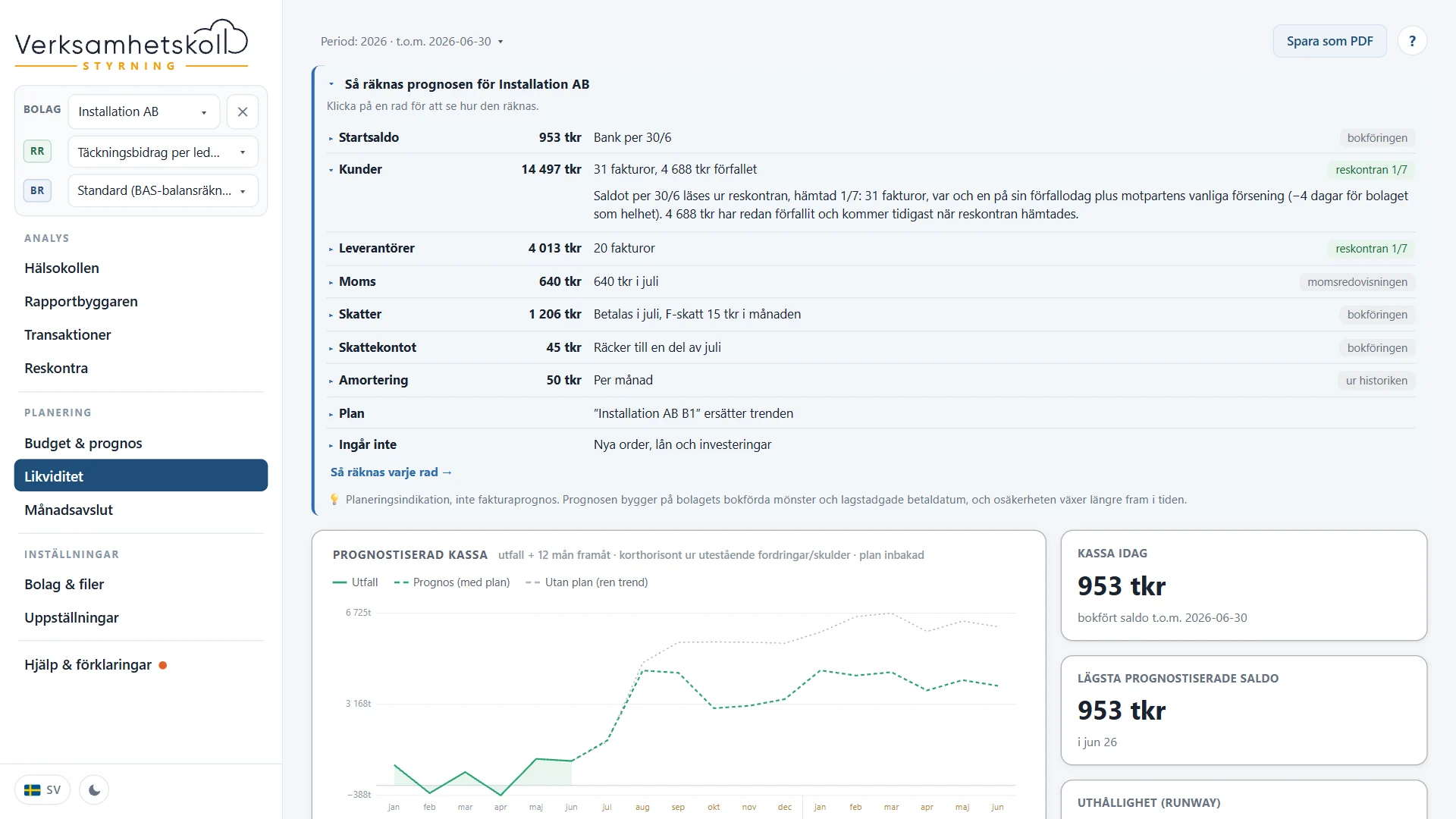
How the rest of the forecast is built is described on the page about the liquidity forecast.
Ask the AI adviser
"Which customers pay late?" or "How does Grävfast pay?" The AI adviser reads the ledgers: unpaid and overdue amounts, the ageing analysis, the payment pattern and the invoices per customer. In its analyses of the Health Check and the liquidity it brings up what is overdue and the customers who usually pay late without anyone asking, and suggests a follow-up question about the customer that stands out.
The figures are the same as in the tab, and the answer is checked against the data before you see it. How that works is described on the page about the AI adviser.
How you do it in Verksamhetskoll
Ledgers is a tab under Analysis in Verksamhetskoll Planning. It is fetched through the same connection as the books, with nothing to set up.
- Customers, Suppliers and Items, with the position today, the ageing analysis, what to follow up and the invoicing or purchases per month.
- A click in a chart or list selects a subset, and the customer and supplier cards show all invoices.
- The invoice with its lines and attachment, and the journal entry's attachments from the journal entry.
- Reconciled with accounts receivable and accounts payable in the books, every night.
- The liquidity forecast counts the open invoices and the customers' payment patterns.
- The AI adviser answers who pays late and what is overdue.
Storage and AI processing in Microsoft Azure Sweden Central. The connections are described on the page about integrations, and price and terms on the pricing page.
Common questions
Questions that often come up.
- What is a customer ledger?
- A customer ledger is the list of the company's customer invoices: what each customer has been invoiced, what has been paid and what is left. The total of the open invoices should match the accounts receivable in the books. The supplier ledger is the same thing for supplier invoices and accounts payable.
- What is an ageing analysis?
- An ageing analysis groups the unpaid invoices by how long ago they fell due, or how long is left until the due date. It shows at once whether the overdue amount is one old invoice or many new ones, and how much is expected in over the next few weeks.
- Which accounting systems work?
- Hogia, Fortnox and Spiris. The ledgers are fetched through the same connection as the books. A SIE file is not enough, because it contains only the books and not the invoices. SIE 4 is the Swedish standard format for exporting accounting data.
- Do the ledgers cost extra?
- No. They are included in Planning and in Planning for organisations.
- How often are they updated?
- Every night, together with the books.
- Do you store the invoices?
- The invoice data, such as amounts, dates and lines, is stored in your own database in Sweden, like the rest of the books. The files themselves, the invoice as a PDF and the attachments to journal entries, are fetched from the accounting system each time you open them and are not stored.
Further reading